Strategies and Tips
Organizing photos has always been a problem even in the age of film though the volume of photos people can generate has magnified significantly with digital. There are a number of strategies for organizing photos and I will go into some detail what I do and perhaps you can take use this my process or develop your own to help you keep your images sorted. The key is to figure out your system and then make sure to follow it as you unload photos from your camera onto your computer because once you get behind it can be hard to find the time and/or the motivation to clean up the files. Then you run the risk of losing photos you treasure either because you accidentally delete them thinking they are stored somewhere else or your computer dies and you don’t get them backed up properly.
Really the only way to organize digital images is to figure out some sort of file structure that you can place your photos into. It seems that people typically decide to organize by date (ie 2-15-2015), or event name (ie “Christmas at Grandma’s”). Now there are advantages and disadvantages to both. For instance, you may not remember what date something happened on so you will find yourself spending a decent amount of time searching through folders trying to find the photos you are looking for. Also, if you don’t use the right date format you will find that your folders won’t be in the order you expect. For instance, if you use the format 1-7-2015, then all your January dates will be grouped together, then February, etc. On the other hand, if you list it by event name and you don’t remember what you called the event – for instance you remember is was at Grandma’s house, but you forgot you called it “Christmas at Grandma’s” you will have to read each folder name until you find it. What I have found that works the best is a combination of the two.
 |
| Here is an example of how I organize my photos. |
My top level folder I call “Photography”. Under that I have a folder for different years 2007, 2008, 2009… etc. Within each
year I have folders for events “Renaissance Fair”, “4th of July”, and the like. Since I started I have gotten into Milky Way time lapse which has become quote a large portfolio. Each shoot yields hundreds of photos and since I didn't want to have to dig through my general photography images to find these I created a new broad category labelled “Time Lapse.” In this folder I use a slightly different strategy to organize my files since I seem to shoot in the same locations regularly and the date is irrelevant to me, under the main folder I have a folder for different locations. Those folders are then sub divided into more folders with descriptive names like “Silos with clouds” – which means something to me but probably not anyone else. I have also created large broad categories to organize photos of local bands I shoot, Infrared photography and one folder dedicated to my daughter.
 |
| This shows how Lightroom is organized . |
As you broaden your photography interests you might make other broad categories as well – such as Weddings or Real Estate or what have you. This works well not only for general file organization, but also works well in Lightroom. Now each broad category can become its own Lightroom catalog. The only issue I have had is if you want to transfer images from one catalog to another it can be a little cumbersome – but perhaps this was solved since v2.7( yeah I am a little behind the times…)
Maybe you are just taking pictures of your family and some landscapes or whatnot you could still separate the images into broad categories such as “Kids” or “Dogs.” My mother-in-law takes pictures of trees. She could have one folder labelled “Trees”, a folder for “Family” and then “General.” Really, you can adapt this to you own personal needs.
One note that I would like to stress, if you do choose to label folders by date, is not to use the standard American date format (ie month-day-year). The folders, which are usually sorted by name, will have all the months grouped together and your folders will be out of chronological sequence. So, for example, all your January folders will be together, then all your February and so on and so on. See example below. The 1/1/2001 then the 1/1/2002 are next to each other.
 |
| Naming Files with month first will group months together as opposed to grouping years together. |
My suggestion is to label them year first, then month and day - always using 4 digits for year, 2 digits for month and 2 digits for day. See below. This standardizes the titles of the folders and makes it easier to find a particular date.
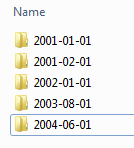 |
| Name them with year first and they will be in chronological order. |
Backing Up Files:
On a side note, once you have a pretty well established file system, backing up files becomes that much easier. I am not going to get into to much detail here since this is a whole other topic in itself but I mention it now since you should develop a backup routine because no hard drive or computer is going to last forever. There are a couple different things you can do now to help protect your files. One is to back them up onto an external drive on a regular basis. They have become much more affordable and you can find a 1TB external hard drive for about $60 online. Another option is to use a "Cloud" backup. Meaning you upload your images/files to some online service. This is a great option since internet servers (where your files will be stored ) have a very regimented and robust backup process and its highly unlikely that the data will be lost. There are a couple disadvantages to this however, one being there is likely a monthly/yearly cost if you want to store more than 5GB of data, and secondly, uploading a lot of large files may take a long time or be impractical if you don't have access to high speed internet.


